Make pitch & frequency calculator part of your practice
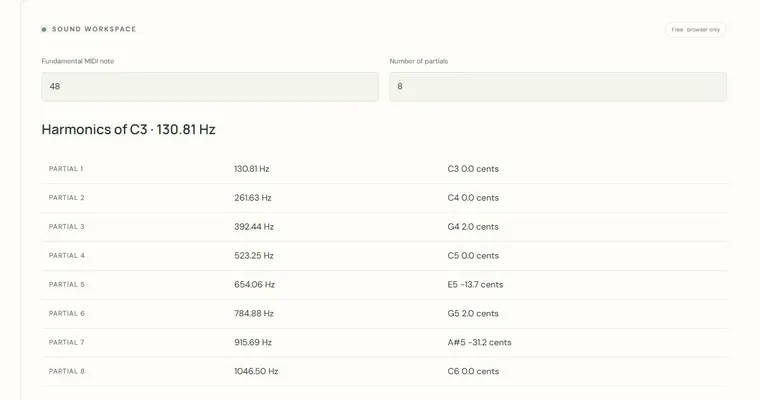
The Pitch and frequency calculator converts MIDI note numbers into hertz and identifies the nearest equal-tempered note to any frequency you enter. It is a numeric tool: it calculates and reports, and it plays one short example tone. Use it to connect the names you see on a keyboard with the vibration rates behind them.
What the frequency result means
The frequency is the number of cycles per second, measured in hertz. With A4 set to 440 Hz, MIDI 69 is A4 at 440 Hz. Each semitone multiplies the frequency by the twelfth root of two, roughly 1.05946, and twelve semitones multiply it by exactly 2. That is why MIDI 81 (A5) reads 880 Hz, a 2:1 ratio that we hear as an octave. Seeing this ratio in numbers helps explain why octaves sound equivalent even though their frequencies differ.
What the cents offset tells you
When you enter a frequency in the identification field, the tool finds the nearest equal-tempered note and reports the difference in cents, where 100 cents equal one semitone. A positive value means your input is above that note; a negative value means it is below. Small offsets are normal in real playing and singing, and comparing them with equal temperament shows how far a sound drifts from the grid of twelve equal steps. Equal temperament is a convention, so an offset is a measurement against that convention, not a verdict on the sound.
Why changing tuning matters
A4 tuning sets the reference for every calculated frequency. Keep MIDI 69 selected and change A4 from 440 to 442 Hz, and the pitch name stays A4 while every frequency shifts upward. This shows that a note name is a relationship, while its hertz value depends on a reference choice. Musicians tune orchestras and instruments to different references, so the same written note can sound at different frequencies. This tool does not measure sound; it only computes. Use a physical instrument or tuner app to hear and check what a real string or pipe actually produces.
Read the full piano reference table
Expand the 88-note reference table to compare A0 through C8. Each row includes its MIDI number and frequency at the chosen A4 tuning. Changing that reference updates every row. The numeric conversion and reference table do not listen to a microphone; use the separate tuner for a permission-based monophonic estimate.
Try it step by step
- Set MIDI note number to 69 and A4 tuning to 440 Hz, then read the calculated frequency; it should show 440 Hz.
- Change the MIDI note number to 81 and compare the result with 880 Hz. Confirm that twelve semitones double the frequency.
- Use the preview control to hear the selected MIDI pitch at the chosen tuning, then return to the calculator and note the displayed frequency.
- Keep MIDI 69 selected, change A4 tuning to 442 Hz, and observe that the pitch name remains A4 while the frequency rises. Then enter a frequency such as 445 Hz in the identification field and read the nearest note and cents offset.
A concrete example
Start with MIDI 69 at A4 = 440 Hz. Going up twelve semitones to MIDI 81 gives 440 × 2 = 880 Hz, which is A5. If you enter 441 Hz in the identification field, the nearest note is still A4 because 441 is closer to 440 than to A#4 (about 466 Hz). Its offset is about +3.9 cents, which is positive because 441 is above 440.
A common wrong turn
Assuming that a larger cents value, or a different hertz value for the same note name, means the note is a different pitch class. For example, reading 442 Hz and thinking it is no longer A.
Try this instead: Remember that the pitch name follows the MIDI number and equal temperament, while the frequency depends on the A4 reference. A4 at 442 Hz is still A4; it is just tuned higher. Check the cents offset to see how far a frequency sits from its nearest equal-tempered note.
Where to go next — and why
This guide was drafted with Claude Haiku and edited against this tool’s implemented controls. Report a confusing instruction or incorrect example.